

SEO tools are software that show you how your website performs in search and what to fix to rank higher. They help you find keywords, check technical errors, review content, study backlinks, and track rankings. Beginners can start free with Google Search Console, Google Analytics, Google Trends, and PageSpeed Insights. Paid tools such as Ahrefs and Semrush become useful when you need deeper keyword and competitor data.
The hard part is not finding tools. There are hundreds. The hard part is knowing which one solves which problem. This guide sorts tools by the job they do, so you never pay for a tool you do not need.
Last updated: October 2026. Written by the Worsoo SEO team.
The 6 Jobs SEO Tools Do
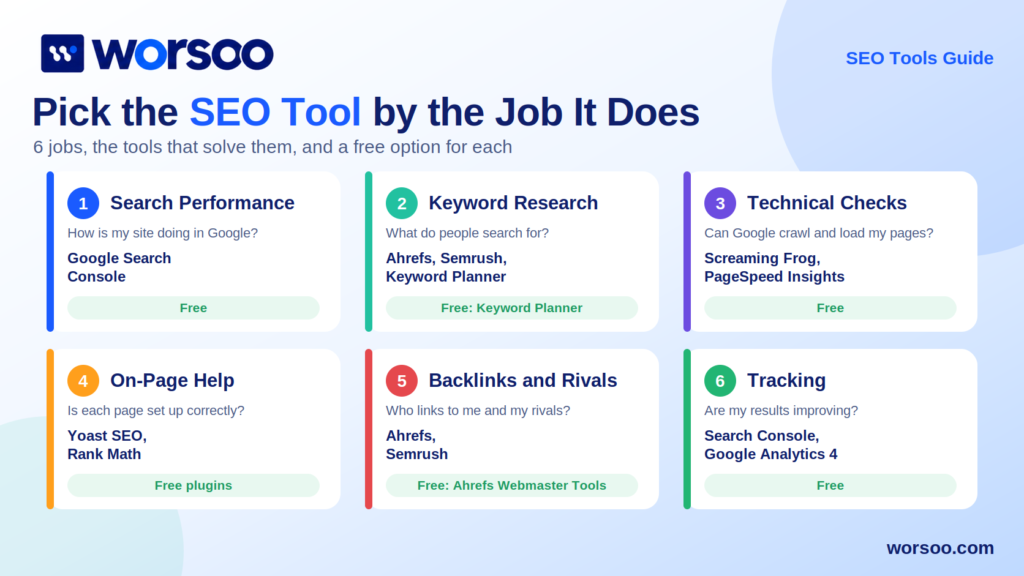
Do not start with a tool name. Start with the problem. The table below links each problem to the type of tool that solves it.
| Job | Question It Answers | Example Tools | Free Option |
|---|---|---|---|
| Search performance | How is my site doing in Google? | Google Search Console | Yes |
| Keyword research | What do people search for? | Ahrefs, Semrush, Keyword Planner | Yes, limited |
| Technical checks | Can Google crawl and load my pages? | Screaming Frog, PageSpeed Insights | Yes |
| On-page help | Is each page set up correctly? | Yoast SEO, Rank Math | Yes |
| Backlinks and rivals | Who links to me and to my competitors? | Ahrefs, Semrush | Partly |
| Rank and traffic tracking | Are my results improving? | Search Console, GA4, rank trackers | Yes |
Most beginners need only the first row at the start. Everything else comes as the site grows.
Start Free: The Zero Cost Stack
Ahrefs studied about 14 billion pages and found that 96.55% get no traffic from Google. Spending money on tools will not fix that. Picking the right topics and fixing real problems will. So begin with free tools made by Google.
| Tool | What It Does | Best First Task |
|---|---|---|
| Google Search Console | Shows clicks, impressions, indexing, and errors | Submit your sitemap and check the Pages report |
| Google Analytics 4 | Shows what visitors do after they arrive | Find your top landing pages |
| Google Keyword Planner | Gives search volume ideas inside Google Ads | Check volume for a new topic |
| Google Trends | Shows if interest is rising or falling | Compare two topic ideas before you write |
| PageSpeed Insights | Tests speed and Core Web Vitals | Test your homepage and one article |
| Bing Webmaster Tools | Shows Bing search data | Verify your site in five minutes |
| Rich Results Test | Checks structured data | Test a page with schema markup |
Search Console is the most important one. It shows real Google data, not estimates. In June 2026, Google added Search Generative AI performance reports. They show how often your pages appear inside AI Overviews and AI Mode, by page, country, device, and date. Google rolled them out to all sites worldwide by the end of August.
Here is the catch. The first release shows impressions only. There is no click data and no query data. Treat it as a visibility check, not a traffic report. Use it next to your normal Performance report.
Keyword Research Tools
Keyword tools tell you what people type into Google and how hard it is to rank. Our guide on SEO keywords and keyword research explains the full process. Here is how to read the numbers you will see.
| Metric | What It Means | How To Use It |
|---|---|---|
| Search volume | Estimated monthly searches | Use it to compare topics, not as a promise |
| Keyword difficulty | Estimate of how hard it is to rank | Start with low and medium scores on a new site |
| Traffic potential | Total traffic the top page gets across many keywords | Better than volume alone |
| CPC | What advertisers pay per click | A hint of commercial value |
| SERP features | Snippets, videos, AI Overviews on the page | Shows what format Google prefers |
Here is an insight many beginners miss. Every score in a third party tool is an estimate. Keyword difficulty, domain rating, and traffic numbers are not Google data. Two tools can show different numbers for the same keyword. Use them to compare options, then confirm with the live search results. Our guide on search intent in SEO shows how to read those results.
Technical SEO Tools
Technical tools answer one question. Can Google find, crawl, and load your pages without trouble?
| Tool | What It Finds | Notes |
|---|---|---|
| Screaming Frog SEO Spider | Broken links, redirects, missing titles, duplicate pages | The free version crawls up to 500 URLs |
| PageSpeed Insights | Speed and Core Web Vitals problems | Uses real user data when available |
| Search Console Pages report | Indexing problems | Shows why pages are not indexed |
| Ahrefs Webmaster Tools | Site audit for your own verified sites | Free for sites you own |
Speed matters, so learn the three Core Web Vitals targets. Google defines a good score as LCP under 2.5 seconds, INP under 200 milliseconds, and CLS under 0.1. LCP measures how fast the main content loads. INP measures how fast the page reacts to taps and clicks. CLS measures how much the layout jumps.
Run a crawl once a month. Our SEO audit guide and our guide to technical SEO show what to fix first.
On-Page and Content Tools
These tools help each page follow best practice. Most run inside your website editor.
WordPress powers about 42% of all websites, according to W3Techs. That is why WordPress plugins are the most common on-page tools.
| Tool | Best For | Watch Out For |
|---|---|---|
| Yoast SEO | Titles, meta descriptions, sitemaps, basic checks | Green lights do not guarantee rankings |
| Rank Math | Schema, redirects, and keyword tracking in one plugin | Too many features can slow a small site |
| Content editors such as Surfer or Clearscope | Topic coverage ideas from top results | Copying their outlines creates thin, similar pages |
| Grammarly or similar | Spelling and clarity | Does not check facts |
A word of warning. Never chase a plugin score. A perfect green score on a weak page is still a weak page. Our guide to on-page SEO and our article on SEO content writing explain what actually moves rankings.
Backlink and Competitor Tools
Links are still a major signal. Backlink tools show who links to you and who links to your rivals. Ahrefs and Semrush lead here. Both keep large link databases.
Use them for three jobs.
- Find sites that link to several competitors but not to you
- Spot broken links on other sites that you can replace with your page
- Check the quality of a site before you ask for a link
Our off page SEO guide shows how to use this data. If you want to compare the two big tools, read our next guide on Ahrefs vs Semrush.
Tracking Tools: Search Console vs Analytics
Beginners often mix these up. They answer different questions.
| Question | Use This Tool |
|---|---|
| Which queries show my site in Google? | Search Console |
| How many people clicked from Google? | Search Console |
| What did visitors do on my site? | Google Analytics 4 |
| Which pages lead to leads or sales? | Google Analytics 4 |
| Where do I appear in AI Overviews? | Search Console generative AI reports |
Use both together. Search Console shows how people find you. Analytics shows what they do next.
Which Tools Fit Your Stage?
You do not need every tool. Match the stack to your size.
| Stage | Goal | Suggested Stack |
|---|---|---|
| Beginner, new site | Learn and fix basics | Search Console, GA4, PageSpeed Insights, Google Trends, one WordPress SEO plugin |
| Growing blog or small business | Find topics and win links | Everything above plus Ahrefs or Semrush and Screaming Frog |
| Agency or large site | Scale, report, and compare | Paid suite, crawler, rank tracker, reporting dashboard |
Add one paid tool at a time. Wait until a free tool stops answering your questions. If you cannot say what decision a tool will help you make, do not buy it yet.
A Real Example: Fixing a Traffic Drop With Three Tools
Here is how tools work together on a common problem. A page lost clicks. What do you do?
| Step | Tool | What You Check |
|---|---|---|
| 1 | Search Console | Which pages and queries lost clicks, and when |
| 2 | Screaming Frog | Did a redirect, noindex tag, or broken link appear? |
| 3 | Ahrefs or Semrush | Did a competitor take the top spot or win new links? |
| 4 | Live search results | Has the intent or format of the results changed? |
No single tool gives the answer. The pattern across tools does. Add your own numbers when you write up a case like this, and never invent a result.
A 30 Minute Weekly Routine
Use this simple routine on any site.
- Open Search Console and check clicks, impressions, and new errors
- Review the Pages report for newly excluded URLs
- Check the top five rising and falling queries
- Run PageSpeed Insights on your newest page
- Write down one action for the week
Small and steady beats big and rare. Combine this routine with our SEO checklist for a full site review.
Mistakes People Make With SEO Tools
| Mistake | Why It Hurts | Fix |
|---|---|---|
| Buying a paid suite on day one | Costs money before you know your needs | Start free and upgrade later |
| Trusting scores as facts | Third party scores are estimates | Confirm with Search Console and live results |
| Chasing green lights | Plugin scores do not equal rankings | Focus on helpful, original content |
| Copying competitor outlines | Creates thin, repeated pages | Add original proof and your own view |
| Ignoring Search Console | Misses real Google data | Check it every week |
| Using AI tools without review | Risks wrong facts and generic text | Read our guide on AI content and SEO |
Frequently Asked Questions
What are SEO tools?
SEO tools are software that measure and improve how your website performs in search. They cover keyword research, technical checks, content review, backlinks, and rank tracking.
What are the best free SEO tools?
Google Search Console, Google Analytics 4, Google Keyword Planner, Google Trends, PageSpeed Insights, and Bing Webmaster Tools. Screaming Frog also has a free version for small crawls.
Do I need paid SEO tools to rank?
No. Many sites rank using free tools and good content. Paid tools save time and add deeper keyword and backlink data once your site grows.
Which SEO tool should a beginner use first?
Google Search Console. It shows real Google data about your site, including clicks, impressions, and indexing problems.
Are SEO tool numbers accurate?
Search Console data comes from Google. Scores like keyword difficulty and domain rating in third party tools are estimates. Use them to compare options and not as exact facts.
Can SEO tools track AI Overviews?
Search Console now has generative AI reports that show impressions in AI Overviews and AI Mode. They do not show clicks or queries yet. Many paid tools also track AI visibility with their own methods.
Final Thoughts
SEO tools do not rank websites. People do. Tools only give you data. The value comes from what you decide to do with it.
Start with the free stack. Learn to read the numbers. Add paid tools only when you hit a clear limit. Then build a short weekly habit and stick to it.
Want an expert to review your site with the right tools? Worsoo offers SEO audits, keyword research, and content strategy. Visit worsoo.com and tell us your goals.
1 comment on “What Are SEO Tools? Complete Guide for Beginners”