

Have you ever published a new blog post or service page but struggled to find it on Google? One possible reason is that the page has not been crawled or indexed yet.
Website crawling and indexing are two essential stages of how search engines discover and process web pages. Crawling allows search engines to access pages and their content, while indexing involves analyzing and storing information about eligible pages so they can potentially appear in search results.
Understanding these processes helps website owners identify technical SEO problems, improve page discovery, and troubleshoot missing pages.
However, crawling and indexing do not guarantee rankings. Google must also determine whether a page is suitable and relevant enough to appear for a particular search.
In this guide, you will learn how website crawling and indexing work, the differences between them, why pages may not appear on Google, and how to resolve common technical SEO issues.
What Is Website Crawling in SEO?
Website crawling is the process through which search engines use automated programs to discover and access webpages.
Google uses automated crawlers, including Googlebot, to explore URLs, retrieve page content, and discover links to other pages.
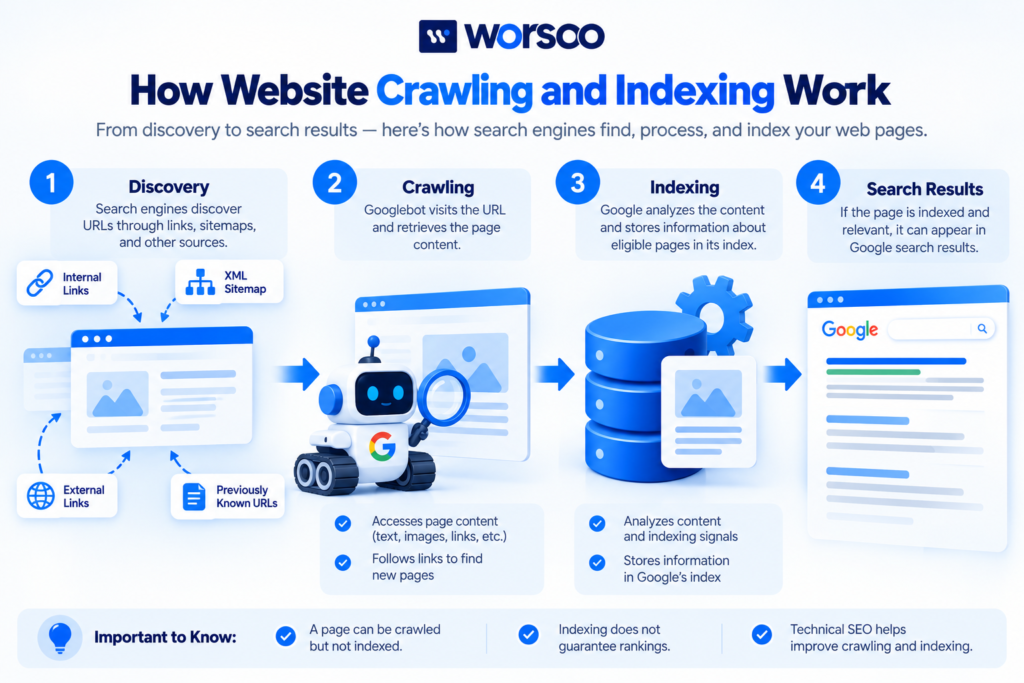
For example, imagine that you publish a new article on your website. Google may discover its URL through an internal link, an external link, or a submitted XML sitemap. If Googlebot decides to visit the URL and can access it, the page can be crawled.
During crawling, Google can retrieve information such as text, links, images, and other resources required to understand the page.
However, not every discovered URL is crawled immediately. Crawling depends on factors such as accessibility, the website’s responses, Google’s crawling systems, and the importance of the URL within the wider web.
According to Google’s explanation of how Search works, crawling is the stage in which Google discovers pages and downloads their content.
How Does Googlebot Discover Website Pages?
Googlebot can discover URLs through several routes.
Internal links: Links between pages on your own website help Google discover new content. For example, a link from your SEO services page to a related educational article can make that article easier to find.
External links: A link from another website can introduce Google to a URL it has not previously discovered.
XML sitemaps: A sitemap provides a list of URLs that you want search engines to discover and potentially crawl.
Previously discovered URLs: Google may revisit pages it already knows about to check for changes or updated content.
For this reason, a newly published webpage should not exist in isolation. Connect it to relevant pages through a clear internal linking structure and include its canonical URL in your sitemap when appropriate.
You can also consult Google’s sitemap documentation to understand how sitemaps support URL discovery.
What Is Indexing in SEO?
Indexing is the process through which a search engine analyzes a webpage and stores information about it in its search index.
After Google crawls a page, it may process the page’s text, images, title, links, metadata, and other relevant information.
Google also evaluates factors such as duplicate content and canonical URLs when deciding how a page should be represented in the index.
If Google determines that a page is suitable for indexing, it may become eligible to appear in search results.
However, a crawled page is not automatically indexed.
Google may crawl a page but decide not to index it. This can happen for several reasons, including duplicate content, limited usefulness, technical directives, or other indexing considerations.
For example, if you publish two pages that provide substantially the same information, Google may select one as the canonical version rather than indexing both separately.
Similarly, a page containing a noindex directive can be excluded from Google Search when Google crawls the page and processes that directive.
Read Google’s documentation on blocking search indexing for more information.
Does Indexed Mean Ranked?
No. Indexing and ranking are different processes.
Indexing means Google has stored information about a page in its index. Ranking determines where eligible results may appear for a particular search query.
An indexed page might rank on the first page, appear much lower in the results, or receive little search visibility.
Its performance depends on relevance, content usefulness, competition, and many other ranking considerations.
The goal of technical SEO is to ensure important pages can be accessed and evaluated correctly, while content optimization helps those pages satisfy users’ needs.
Crawling vs Indexing: What Is the Difference?
Although crawling and indexing are closely related, they serve different purposes.
| Feature | Crawling | Indexing |
|---|---|---|
| Main purpose | Discover and access webpage content | Analyze and store information about pages |
| Typical activity | Googlebot retrieves a URL | Google processes content and indexing signals |
| Depends on accessibility | Yes | The page must be accessible for Google to process it normally |
| Guarantees search visibility | No | No |
| Common problems | Blocked crawling, server errors, undiscovered URLs | Noindex directives, duplicate content, indexing selection |
| Useful diagnostic tool | URL Inspection and crawl reports | Page Indexing and URL Inspection reports |
Consider a practical example.
You publish a new service page and link to it from your homepage. Google discovers the URL and crawls it successfully.
However, the page contains an accidental noindex directive.
Google may access the content but exclude the page from its search index.
In this situation, crawling has taken place, but the page is not eligible to appear in Google Search while the directive remains effective.
Correcting the directive may resolve the issue, although Google must recrawl and reassess the URL.
Why Is Website Crawling and Indexing Important for SEO?
Crawling and indexing provide the technical foundation for organic search visibility.
If Google cannot access an important page, it may struggle to discover or process the page’s content.
If a page is excluded from the index, it generally cannot appear as a normal organic webpage result for relevant searches.
Here are four reasons website owners should pay attention to these processes.
1. Help Important Pages Get Discovered
A website may contain valuable blog posts, service pages, product listings, and resources.
If those pages are difficult to discover through internal links or other discovery methods, search engines may take longer to find them or may not find them at all.
A useful website hierarchy, descriptive anchor text, and a valid sitemap can support discovery.
2. Identify Technical SEO Problems
Crawling and indexing reports can reveal problems such as:
- Blocked URLs
- Server errors
- Accidental noindex directives
- Redirect issues
- Duplicate or non-canonical pages
Identifying these problems helps you prioritize technical fixes instead of guessing why a page is missing from search results.
For a broader review of your website’s technical setup, explore Worsoo’s website SEO audit guide.
3. Help Updated Content Become Reassessed
When you update a webpage, Google must discover the changes and process the page again before those changes can be reflected in its search systems.
Internal links, sitemaps, and the URL Inspection tool can help Google discover updated URLs.
However, requesting a crawl does not guarantee immediate indexing or ranking changes.
4. Support Long-Term Search Visibility
A technically accessible website makes it easier for search engines to find and understand important content.
Combined with useful information, relevant keywords, clear internal linking, and a good visitor experience, a sound technical foundation supports a stronger SEO strategy.
How to Check Whether Google Has Indexed Your Website
Google Search Console is one of the most useful tools for investigating whether Google has crawled and indexed individual pages.
Step 1: Open Google Search Console
Sign in to Google Search Console and select the correct website property.
You must have access to the relevant property to inspect its reports.
Step 2: Use the URL Inspection Tool
Enter the full URL of the page you want to check into the URL Inspection field.
The tool reports Google’s available information about that URL, including its index status and details about crawling or indexing where available.
You may see statuses indicating that the URL is indexed, excluded, or not currently indexed.
Read the explanation associated with the specific status instead of assuming every exclusion is an error.
Step 3: Review the Page Indexing Report
Open the Page Indexing report in Search Console.
This report groups URLs according to their indexing status and provides information about pages Google knows about.
Review the affected URLs and investigate whether the cause is intentional or accidental.
For example, a deliberately excluded thank-you page may be fine, while a critical service page excluded because of an incorrect noindex setting needs attention.
Step 4: Test the Live URL
If a page should be indexed but appears to have an accessibility issue, use the live URL test within URL Inspection.
This can help identify whether Google can currently access the page and retrieve the resources required to render it.
Keep in mind that a successful live test does not guarantee that Google will index the page.
Step 5: Request Indexing When Appropriate
After fixing an issue or publishing important content, you may use the URL Inspection tool to request indexing.
This request can encourage Google to recrawl a URL, but repeated requests do not guarantee faster processing.
For large numbers of URLs, use a valid sitemap and ensure your website’s important pages are properly linked.
Common Reasons Google Does Not Crawl a Website
When Google does not crawl a page, the first task is to investigate whether it can discover and access the URL.
1. The Page Has No Internal Links
A page that is not linked from other discoverable pages may be difficult for Google to find.
Add relevant internal links from existing articles, category pages, or service pages where they genuinely help readers.
Use descriptive anchor text rather than adding unrelated links solely for SEO.
2. Robots.txt Blocks Crawling
The robots.txt file contains rules that tell compliant crawlers which parts of a website they may access.
An incorrectly configured rule can block important pages or resources.
For example, a broad disallow rule may prevent Googlebot from crawling a directory you intended to make searchable.
Review the file carefully before changing it. Robots.txt is a crawling control, not a direct indexing-removal mechanism.
3. The Server Returns Errors
If a website frequently returns server errors or becomes unavailable, Googlebot may reduce crawling activity.
Check server logs, hosting performance, and HTTP response codes to identify the cause.
Important pages should return the correct successful response when they are available.
4. The Sitemap Contains Incorrect URLs
A sitemap should list the URLs you want Google to discover and potentially index.
Avoid including redirected URLs, non-canonical versions, or pages you deliberately exclude from search.
Submitting an accurate sitemap helps, but it does not force Google to crawl every listed page.
Common Reasons Google Does Not Index a Page
Sometimes Google successfully crawls a webpage but does not include it in the index.
These are some common situations worth investigating.
1. An Accidental Noindex Directive
A page may contain a noindex meta tag or HTTP header.
If you want the page indexed, check whether the directive was added by your CMS, an SEO plugin, or a custom configuration.
Remove it only when doing so matches your indexing goals.
A noindex directive is useful for pages that should not appear in search, so it should not be removed indiscriminately.
2. Duplicate or Very Similar Content
Google may identify multiple URLs with substantially similar content and choose one canonical version.
Check canonical tags and URL variations to confirm that the preferred page is the version you want Google to index.
If two pages serve genuinely different purposes, make those differences clear through useful, distinct content.
3. Content Provides Limited Additional Value
Technical accessibility alone does not guarantee indexing.
If a page provides little original or useful information, Google may decide not to include it in its index.
Improve the page by answering the intended searcher’s question more completely, adding relevant examples, and removing unnecessary repetition.
Do not add words simply to reach a particular length.
4. The Page Is New
New pages sometimes require time to be discovered, crawled, and evaluated.
Make sure the URL is accessible, linked appropriately, and included in the sitemap where suitable.
Monitor Search Console instead of repeatedly resubmitting the same unchanged URL.
5. Canonical Signals Point Elsewhere
If canonical tags or other signals suggest that another URL is the preferred version, Google may choose to index that other URL instead.
Confirm whether the page is supposed to stand alone or form part of a group of duplicate URLs.
Use Google’s guide to canonical URLs to understand how canonicalization works.
How to Improve Website Crawling and Indexing
You do not need to change every technical setting to improve your website’s search accessibility.
Start with the most important pages and apply these practical recommendations.
Create a Clear Internal Linking Structure
Link relevant pages together so visitors can move between related topics easily.
For example, an article about technical SEO can link to a detailed SEO audit guide when readers need help identifying technical issues.
This creates a useful path for visitors and helps search engines discover related resources.
Keep Your XML Sitemap Accurate
Include the preferred URLs of pages you want search engines to discover and potentially index.
Update the sitemap when your website changes, and investigate any errors reported in Search Console.
Check Indexing Directives
Review important pages for accidental noindex directives and check that canonical tags point to the intended URLs.
A single incorrect configuration can affect important pages, so test changes before applying them sitewide.
Fix Important Technical Errors
Investigate server failures, redirect loops, blocked resources, and broken internal links.
Prioritize the URLs that matter to your business, such as key service pages and valuable articles.
Improve Content Quality
Make sure each page has a clear purpose and provides meaningful value to visitors.
Use relevant headings, accurate information, helpful examples, and clear navigation.
Avoid creating multiple pages targeting almost identical questions unless they genuinely serve different needs.
Monitor Search Console Regularly
Review indexing reports and important URL statuses on a regular basis.
After a technical fix, give Google time to recrawl the affected pages and confirm whether the problem has been resolved.
Frequently Asked Questions About Crawling and Indexing
What is the difference between crawling and indexing?
Crawling is when a search engine discovers and accesses webpage content. Indexing is when it analyzes and stores information about eligible pages so they can potentially appear in search results.
How long does Google take to crawl and index a new page?
There is no fixed timeline. Google may discover and crawl some URLs quickly, while others take longer or may never be indexed. Sitemap submission and internal links can help with discovery but do not guarantee indexing.
Does a sitemap guarantee Google will index my pages?
No. A sitemap helps Google discover URLs, but Google decides which pages to crawl and index. Content quality, accessibility, canonicalization, and other factors may influence the outcome.
Can a page be crawled but not indexed?
Yes. Google may access a page but decide not to index it. Possible reasons include duplicate content, a noindex directive, or other indexing considerations.
Does robots.txt prevent a page from being indexed?
Not necessarily. Robots.txt controls crawling. A blocked URL can sometimes still appear in search results if Google discovers it elsewhere. If you want a page excluded from Google’s index, use an appropriate supported method and make sure Google can access the page to process the directive.
How can I request Google to index a page?
Use the URL Inspection tool in Google Search Console and select the request-indexing option when available. This requests a crawl but does not guarantee indexing or ranking.
Why is my page indexed but not ranking?
Indexing only means Google has included the page in its index. Rankings depend on relevance, usefulness, competition, and other factors. Review the page’s content, target query, internal links, and search performance to identify opportunities.
Improve Your Website’s Technical SEO With Worsoo
Crawling and indexing are essential parts of search visibility, but identifying the cause of a missing page can take more than checking a single setting.
Your website may need better internal linking, a more accurate sitemap, improved technical configuration, or content changes that make important pages more useful.
Worsoo helps businesses strengthen their search presence through strategic website optimization and SEO.
Explore our on-page and off-page SEO services to understand how technical improvements can support a broader search strategy.
If you’re unsure why your important pages are not appearing in search results, contact Worsoo to discuss your website’s SEO needs.
Final Thoughts
Website crawling and indexing work together, but they are not the same process.
Crawling allows search engines to discover and access pages. Indexing allows them to analyze and store information about eligible pages for potential inclusion in search results.
If an important page is missing from Google, investigate its accessibility, indexing directives, canonical signals, internal links, and content quality before making changes.
Use Google Search Console to diagnose problems, verify fixes, and monitor your website over time.
The goal is to make your important pages easy to discover, accessible to search engines, and useful enough to deserve a place in search results.
1 comment on “What Is Website Crawling and Indexing in SEO?”