

A website can have excellent content and relevant backlinks but still struggle in search results if search engines cannot properly access, understand, or index its important pages.
This is where technical SEO comes in.
A technical SEO checklist helps you review the behind-the-scenes elements that allow search engines to discover your website, process its content, and serve relevant pages in search results.
Technical SEO also supports the visitor experience. A secure website that loads properly, works on mobile devices, and has clear navigation makes it easier for people to find what they need.
Whether you manage a business website, an online store, or a content-focused blog, reviewing your technical setup can help you identify problems before they affect your search performance.
In this guide, you’ll learn 25 technical SEO checks covering crawling, indexing, website structure, mobile usability, page speed, security, structured data, and ongoing monitoring.
What Is Technical SEO?
Technical SEO is the process of improving a website’s technical setup so search engines can access, crawl, understand, and index its important pages.
It focuses on how a website works rather than only what its content says.
Common technical SEO activities include:
- Fixing crawling and indexing issues
- Managing redirects and canonical tags
- Maintaining XML sitemaps
- Improving website speed and stability
- Checking mobile usability
- Fixing broken internal links
- Implementing appropriate structured data
- Monitoring technical errors
According to Google’s technical requirements for Search, a page generally needs to be accessible to Googlebot, return a successful HTTP response, and contain indexable content to qualify for indexing.
Meeting these requirements does not guarantee indexing or rankings, but failing them can prevent important pages from appearing in search results.
If you want to understand the broader process, read Worsoo’s guide to a complete website SEO audit.
Technical SEO Checklist: 25 Things to Check
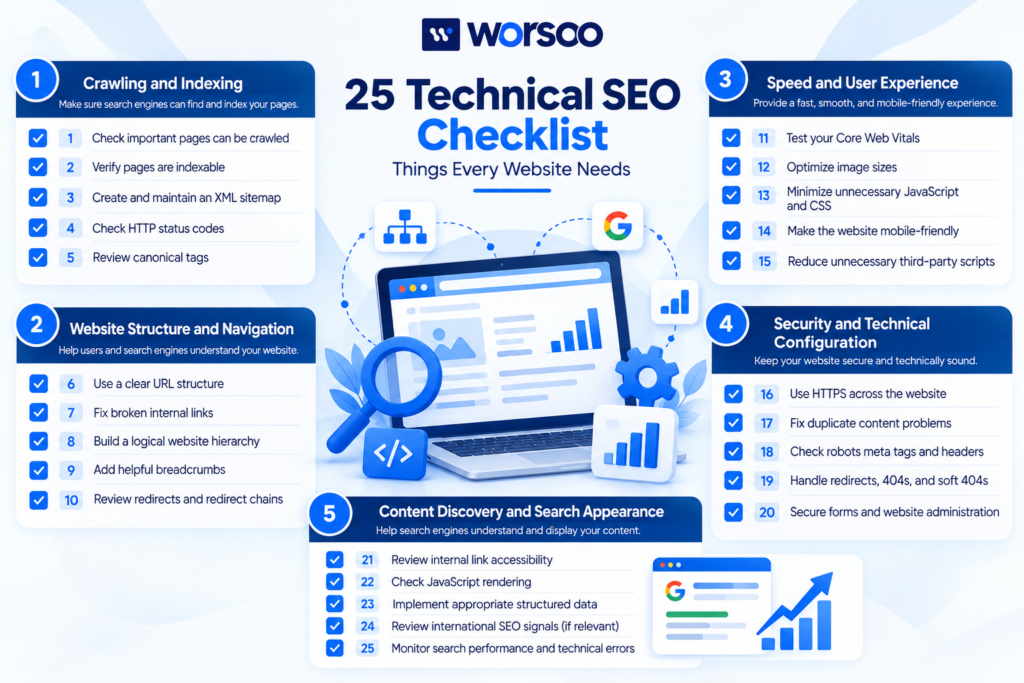
Use the following checklist to review your website. Prioritize issues that prevent important pages from being crawled or indexed before focusing on smaller improvements.
Section 1: Crawling and Indexing
1. Check Whether Important Pages Can Be Crawled
Search engines need to discover and access your important pages.
Review your robots.txt file and ensure it does not unintentionally block important sections of your website.
For example, blocking an entire product directory could prevent search engines from crawling pages you want to appear in results.
Use Google Search Console’s URL Inspection tool to investigate individual URLs and understand how Google accesses them.
Remember that robots.txt controls crawling, not guaranteed removal from search results.
2. Verify That Important Pages Are Indexable
A page may be accessible to visitors but still be excluded from Google’s index.
Check for accidental noindex directives in page-level meta robots tags or HTTP response headers.
This issue can occur after a staging website is migrated to production or when a CMS setting is configured incorrectly.
Review Google’s Page Indexing report to identify affected pages, then inspect important URLs individually.
Do not remove noindex from every page automatically. Pages that should remain private or excluded from search may need it.
3. Create and Maintain an XML Sitemap
An XML sitemap helps search engines discover the URLs you consider important.
Your sitemap should generally contain canonical, indexable pages that you want to appear in search results.
For a WordPress website, an SEO plugin or sitemap feature may generate the file automatically.
Check that your sitemap:
- Loads successfully
- Contains valid, preferred URLs
- Excludes irrelevant or non-indexable pages
- Reflects genuine content updates
You can follow Google’s XML sitemap guidelines to understand how sitemaps work.
Submitting a sitemap can help discovery, but it does not guarantee indexing.
4. Check HTTP Status Codes
Important pages should return the appropriate HTTP response.
A successful page commonly returns 200 OK. Redirected pages typically return a 3xx response, while missing pages often return 404 Not Found.
Investigate unexpected status codes, particularly when an important service page returns an error.
Common issues include:
- Pages returning server errors
- Redirect chains
- Redirect loops
- Broken URLs returning 404 responses
Do not redirect every missing page to the homepage. Redirect only when a relevant replacement exists; otherwise, a genuine 404 may be appropriate.
5. Review Canonical Tags
Canonical tags help indicate which URL should be treated as the preferred version of substantially duplicate or similar pages.
For example, tracking parameters can create multiple URLs that display the same underlying content.
Check whether important pages have appropriate canonical tags and whether those tags point to the intended URLs.
Common mistakes include canonicalizing unrelated pages to the homepage or pointing a valuable page to a URL that redirects or returns an error.
Read Google’s documentation on consolidating duplicate URLs for further guidance.
Section 2: Website Structure and Navigation
6. Use a Clear URL Structure
Readable URLs help users understand what a page is about.
For example, /services/technical-seo/ is easier to interpret than a URL containing a long string of unnecessary parameters.
Use descriptive URLs that match the page’s topic.
Avoid changing established URLs without a good reason. If a change is necessary, implement an appropriate redirect and update internal links.
7. Fix Broken Internal Links
Internal links connect pages within your website.
Broken links lead visitors to unavailable resources and can make important content harder to discover.
Crawl your website periodically and look for internal links that point to 404 pages, outdated URLs, or redirect chains.
Update links to point directly to the correct destination whenever possible.
Pay particular attention to links in:
- Navigation menus
- Service pages
- Blog articles
- Breadcrumbs
- Footer sections
8. Build a Logical Website Hierarchy
Your most important pages should be easy to locate.
For example, a service-based business might organize its website into a homepage, core services, individual service pages, and supporting educational articles.
A logical structure helps visitors move naturally through the website.
It also makes it easier for search engines to understand how pages relate to one another.
Avoid burying valuable pages several unnecessary clicks deep or creating confusing overlapping categories.
9. Add Helpful Breadcrumb Navigation
Breadcrumbs show visitors where a page sits within your website structure.
For example:
Home → SEO Services → Technical SEO
They can help users return to broader categories without repeatedly using the browser’s back button.
Breadcrumbs are particularly useful for larger websites, online stores, and sites with multiple content categories.
Ensure breadcrumb links work correctly and reflect the actual site hierarchy.
10. Review Redirects and Redirect Chains
Redirects are useful when a page moves or a URL changes permanently.
However, long redirect chains can slow down navigation and complicate crawling.
Review important URLs to ensure redirects lead to the correct final destination.
Where possible, update internal links to point directly to the final URL rather than passing through multiple redirects.
Use permanent redirects, such as 301 or 308, when content has permanently moved. Choose the destination based on relevance rather than redirecting unrelated pages simply to preserve traffic.
Section 3: Speed and User Experience
11. Test Your Core Web Vitals
Core Web Vitals measure real-world loading performance, responsiveness, and visual stability.
Google currently uses three main metrics:
| Metric | What It Measures | Good Target |
|---|---|---|
| Largest Contentful Paint (LCP) | Loading performance | 2.5 seconds or less |
| Interaction to Next Paint (INP) | Responsiveness | 200 milliseconds or less |
| Cumulative Layout Shift (CLS) | Visual stability | 0.1 or less |
These are Google’s published thresholds for good Core Web Vitals at the 75th percentile of page visits.
You can review field data in Search Console and test individual pages with PageSpeed Insights.
Core Web Vitals are useful performance indicators, but passing them does not guarantee higher rankings.
12. Optimize Image Sizes
Large image files can increase page loading times, especially on mobile connections.
Improve image performance by:
- Resizing images to their displayed dimensions
- Compressing files appropriately
- Using efficient formats such as WebP or AVIF where supported
- Providing width and height attributes to reduce layout shifts
- Lazy-loading below-the-fold images when appropriate
Avoid lazy-loading the main visible image when doing so would delay the page’s primary content.
Image quality should remain good enough to support the visitor’s experience.
13. Minimize Unnecessary JavaScript and CSS
Themes, plugins, third-party scripts, and tracking tools can add unnecessary resources to a webpage.
Review scripts and stylesheets that delay rendering or create responsiveness problems.
Depending on the implementation, you may be able to remove unused code, defer non-critical scripts, reduce plugin overhead, or load resources only where necessary.
Test changes carefully. Aggressively combining or deferring files can break website functionality.
14. Make the Website Mobile-Friendly
Your website should work properly on smartphones, tablets, and desktop computers.
Check that:
- Text is readable without unnecessary zooming
- Buttons and links are easy to tap
- Navigation works on smaller screens
- Forms fit the viewport
- Important content is available on mobile
Google uses the mobile version of a website’s content for indexing in its mobile-first indexing system.
Use Google’s mobile-first indexing documentation to understand what your mobile website needs to provide.
15. Reduce Unnecessary Third-Party Scripts
Live chat tools, advertising tags, analytics scripts, video embeds, and marketing integrations can affect performance.
Review third-party resources to determine whether they provide enough value to justify their loading cost.
Remove tools that are no longer used and consider loading non-essential scripts only when needed.
Measure the effect of changes rather than assuming every external script is harmful.
Section 4: Security and Technical Configuration
16. Use HTTPS Across the Website
HTTPS helps protect information exchanged between your website and its visitors.
Check that your site uses a valid SSL/TLS certificate and that both internal links and important resources load securely.
If your website has moved from HTTP to HTTPS, ensure redirects point to the secure versions and update canonical tags and sitemap entries accordingly.
Also investigate mixed-content warnings caused by insecure resources loading on secure pages.
17. Fix Duplicate Content Problems
Duplicate or substantially similar pages can complicate URL selection and crawling.
Common causes include:
- URL parameters
- Multiple versions of the same page
- Duplicate product pages
- Unnecessary category variations
- HTTP and HTTPS versions accessible separately
Choose the appropriate solution based on the cause. This may involve canonical tags, redirects, parameter handling, or improving pages so they serve distinct purposes.
Not every similarity is a technical error, and there is no need to rewrite useful content solely to eliminate every overlapping phrase.
18. Check Robots Meta Tags and X-Robots-Tag Headers
Robots directives control how search engines handle pages.
For example, a noindex directive instructs compliant search engines not to include the page in their index.
Review important pages to ensure they do not contain accidental directives that prevent indexing.
Also remember that robots.txt and noindex serve different purposes.
If a URL is blocked from crawling, Google may not be able to see its noindex directive. Follow Google’s guide to controlling indexing when deciding which method is appropriate.
19. Handle Redirects, 404s, and Soft 404s Correctly
A soft 404 occurs when a page appears to be missing but returns a successful HTTP response, or when Google determines that its content functions like a missing page.
For example, a deleted product URL that displays “Product unavailable” but returns 200 OK may need attention.
Use appropriate status codes and redirects based on the actual page content.
Preserve relevant replacement pages where possible, but don’t redirect every removed URL to an unrelated destination.
20. Secure Forms and Website Administration
Technical SEO is primarily about search access, but security and website reliability are essential for maintaining a usable site.
Use secure administrator accounts, strong passwords, appropriate user permissions, and maintained software.
Protect contact forms against spam and ensure they function properly.
Monitor website availability and investigate unexpected downtime, server errors, or security warnings.
A website that frequently fails to load can create problems for both visitors and search engine crawlers.
Section 5: Content Discovery and Search Appearance
21. Review Internal Link Accessibility
Google can generally crawl links implemented as standard HTML anchor elements.
Important pages should have accessible links from other discoverable pages.
Avoid relying exclusively on buttons, scripts, or interaction patterns that do not expose crawlable destinations.
Use meaningful anchor text so visitors and search engines can understand the linked page’s purpose.
Google explains this in its link best practices documentation.
22. Check JavaScript Rendering
Some websites rely heavily on JavaScript to display content and links.
Google can process JavaScript, but rendering and crawling can introduce additional complexity.
Check that important page content, links, and metadata are available as expected when Google processes the page.
Use URL Inspection to compare the indexed information with the live page and investigate missing content or resources.
If key content depends on user interaction that Google cannot trigger, consider rendering the content in a more accessible way.
23. Implement Appropriate Structured Data
Structured data helps search engines understand information about a page and can make eligible content qualify for certain rich-result features.
For example, eligible websites may use appropriate structured data to describe products, organization information, or article content.
Use the schema type that genuinely matches the page.
Validate eligible markup with Google’s Rich Results Test and review the applicable structured data guidelines.
Correct markup does not guarantee a rich result or improve rankings automatically. The page must also meet Google’s eligibility and content requirements.
24. Review International SEO Signals When Relevant
Websites targeting multiple languages or countries may need international SEO configuration.
Review language-specific URLs, localized content, and hreflang annotations where appropriate.
Ensure alternate-language references point to the correct equivalent pages and that each localized version has suitable content for its audience.
If your website serves only one language and market, international SEO tags may not be necessary.
Avoid adding hreflang just because it appears on a technical checklist; implement it when your website structure requires it.
25. Monitor Search Performance and Technical Errors
Technical SEO requires ongoing monitoring because websites change.
New plugins, redesigns, URL changes, and content updates can introduce unexpected problems.
Use Google Search Console to monitor:
- Page indexing
- Search performance
- Core Web Vitals
- Sitemap processing
- Manual actions and security issues
Review server logs or crawl reports where appropriate, especially on larger websites.
Establish a baseline so you can identify meaningful changes after technical updates.
For Google’s overview of site eligibility and good search practices, consult Google Search Essentials.
How Often Should You Run a Technical SEO Audit?
The right schedule depends on your website’s size, complexity, and frequency of changes.
For a small business website, a practical approach is to perform a full technical review periodically and check Search Console for important issues throughout the month.
Larger websites, online stores, and websites that publish frequently may need more frequent automated crawling and monitoring.
Consider performing an additional audit after:
- A website redesign
- A domain migration
- A major URL structure change
- Installing or replacing important plugins
- Changing robots.txt or indexing rules
- A sudden drop in organic visibility
The most important point is to investigate issues quickly when they affect critical pages.
Which Technical SEO Issues Should You Fix First?
Not all technical problems deserve equal priority.
Start with issues that prevent Google from accessing or indexing pages that matter to your business.
A sensible priority order is:
| Priority | Example Issues | Recommended Action |
|---|---|---|
| High | Important pages blocked, accidental noindex, server errors | Resolve immediately |
| High | Incorrect redirects, broken canonical tags | Correct URL handling |
| Medium | Broken internal links, sitemap errors | Repair and validate |
| Medium | Poor Core Web Vitals, slow templates | Measure and optimize |
| Ongoing | Structured data validation, routine monitoring | Review regularly |
The actual priority depends on the problem’s impact. A performance issue affecting every page may be more important than a minor error on an insignificant URL.
Common Technical SEO Mistakes to Avoid
Blocking URLs You Want Indexed
Incorrect robots.txt rules can prevent Googlebot from crawling important content.
Check your rules before and after major website changes.
Treating Every Search Console Warning as a Ranking Problem
Some reports identify optional improvements rather than serious issues.
Understand what each warning means before changing your website.
Using Redirects Without Checking Relevance
Redirecting deleted pages to unrelated destinations may confuse users and search engines.
Choose destinations that genuinely replace the original content.
Installing Too Many SEO Plugins
Multiple plugins that control similar functions can create conflicting settings or unnecessary overhead.
Use tools that serve a clear purpose and remove features that are no longer needed.
Expecting Technical SEO Alone to Guarantee Rankings
Technical SEO helps search engines access and understand your site, but rankings also depend on relevance, content usefulness, competition, and many other signals.
Fixing technical errors is an important foundation, not a ranking guarantee.
Frequently Asked Questions About Technical SEO
What is a technical SEO checklist?
A technical SEO checklist is a list of checks used to identify website issues related to crawling, indexing, redirects, performance, mobile usability, security, and structured data.
What are the most important technical SEO factors?
Start with crawlability, indexability, correct HTTP status codes, canonical URLs, internal linking, and a valid sitemap. Then review performance, mobile usability, security, and relevant structured data.
Can technical SEO improve Google rankings?
Technical SEO can remove obstacles that prevent pages from being discovered, indexed, or understood. However, fixing technical issues does not guarantee higher rankings.
How do I check whether Google has indexed my pages?
Use Google Search Console’s URL Inspection tool for individual URLs and the Page Indexing report to review patterns across your website.
Is technical SEO important for WordPress websites?
Yes. WordPress websites can experience indexing problems, plugin conflicts, slow page templates, broken links, and incorrect canonical settings just like other websites. Review the actual configuration rather than assuming WordPress handles everything automatically.
How long does it take to fix technical SEO issues?
Some issues, such as broken links or incorrect directives, can be corrected quickly. Others may require developer work or major performance changes. Search engines can also take time to recrawl and reassess updated pages.
Improve Your Website’s Technical SEO With Worsoo
A technically sound website gives your content a better opportunity to be discovered and understood by search engines.
However, finding the right fixes requires more than checking boxes. You need to understand how each issue affects your important pages, visitors, and business goals.
Worsoo helps businesses strengthen their search visibility with website optimization and strategic SEO support.
Explore our on-page and off-page SEO services to understand how technical improvements can fit into a broader SEO strategy.
If you’re unsure where to start, contact Worsoo to discuss your website’s SEO needs.
Final Thoughts
This 25-point technical SEO checklist covers the main areas businesses should review to keep their websites accessible, functional, and search-friendly.
Start by checking crawling and indexing, then move through website structure, speed, security, content discovery, and monitoring.
Prioritize significant problems, verify fixes with appropriate tools, and review your website regularly as it grows.
The goal of technical SEO is to make your website easier for search engines to access and easier for people to use—not simply to achieve a perfect audit score.
1 comment on “Technical SEO Checklist: 25 Things Every Website Needs”