

SEO can help a website attract more organic traffic, reach potential customers, and build long-term visibility in search engines. But even a well-designed website can have SEO errors that prevent pages from performing as well as they could.
Some SEO problems are obvious, such as broken links or pages that cannot be indexed. Others are less noticeable, including duplicate content, poor internal linking, missing metadata, slow pages, and weak search intent alignment.
SEO errors are problems on a website that can negatively affect crawling, indexing, rankings, user experience, or organic search performance.
Finding and fixing these problems is an important part of maintaining a healthy website.
The good news is that you do not need to fix every SEO issue at the same time. The most effective approach is to identify the problems, understand their potential impact, and prioritize the issues that matter most.
In this guide, we will explain what SEO errors are, the most common website SEO problems, how to find them, which errors should be fixed first, and how to prevent technical SEO issues from returning.
What Are SEO Errors?
SEO errors are website problems that can make it harder for search engines to crawl, understand, index, or rank your pages effectively.
SEO errors can affect different parts of a website.
For example, a technical error may prevent Google from accessing an important page. A content problem may cause a page to target the wrong search intent. A broken internal link may prevent users and search engines from easily discovering another page.
Common SEO errors include:
- Broken links
- Pages blocked from crawling
- Incorrect redirects
- Missing or duplicate title tags
- Missing meta descriptions
- Duplicate content
- Slow-loading pages
- Poor mobile usability
- Incorrect canonical tags
- Missing internal links
- Thin or unhelpful content
- Incorrect sitemap configuration
- Indexing problems
- Images without appropriate alt text
- Poor URL structures
- Orphan pages
Not every SEO error has the same level of importance.
A missing meta description, for example, is usually very different from accidentally blocking an entire section of a website from being crawled.
That is why SEO auditing should focus on impact and priority, not simply the number of errors reported by a tool.
Why Do SEO Errors Matter?
SEO errors matter because search engines need to be able to discover, crawl, understand, and index your content.
Users also need to be able to navigate your website without encountering technical problems.
Consider a service page that targets an important commercial keyword.
If the page is:
- difficult for Google to crawl,
- blocked from indexing,
- extremely slow,
- poorly optimized for mobile,
- disconnected from the rest of the website,
- or poorly aligned with search intent,
then the page may struggle to generate organic traffic even if the business offers an excellent service.
This is why technical health and content quality should work together.
If you are new to technical SEO, start with this technical SEO checklist to understand the major areas that should be reviewed.
15 Common SEO Errors and Website Problems
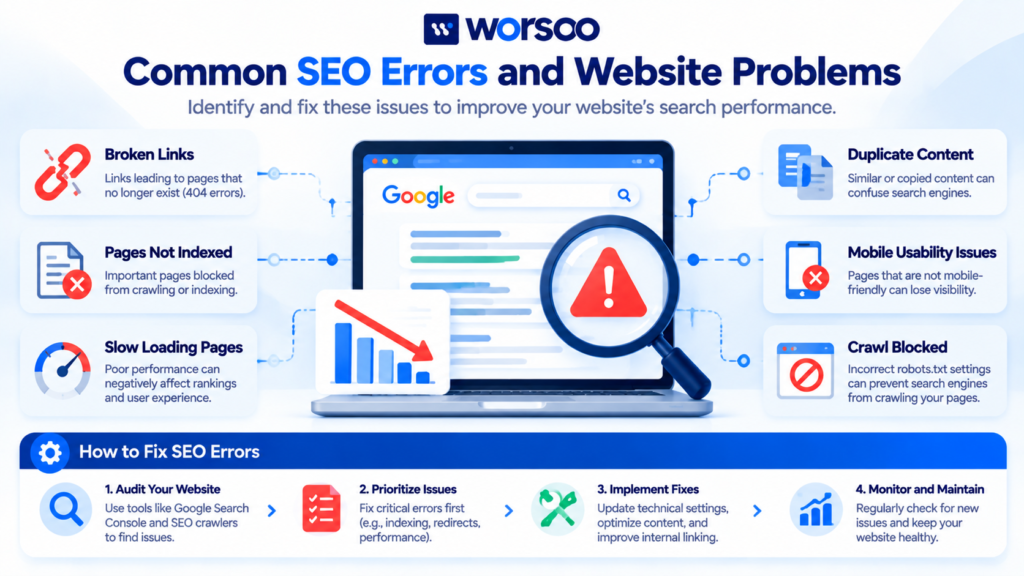
Let’s look at the most common SEO errors that website owners and marketers should know about.
1. Broken Links
A broken link leads users or search engines to a page that no longer works.
For example, a website might link to:
example.com/seo-guide
but the page may have been deleted or the URL may have changed.
The result can be a 404 error.
Broken links can create a poor user experience and may make website navigation less effective.
How to Fix Broken Links
Regularly check important internal and external links.
If a page has permanently moved, redirect the old URL to the most relevant new URL.
If the destination no longer exists and there is no suitable replacement, remove the unnecessary link.
Do not redirect every broken URL to the homepage simply to eliminate 404 errors. Redirects should point to an appropriate replacement when one exists.
2. Pages That Are Not Indexed
One of the most important SEO problems is when an important page is not indexed.
A page generally needs to be accessible and eligible for indexing before it can appear in Google’s organic search results.
Possible reasons for a page not being indexed include:
noindexdirectives- Crawl problems
- Canonicalization issues
- Duplicate content
- Server errors
- Poor internal linking
- Newly published content
- Other technical issues
You can use Google Search Console to investigate indexing and URL-related issues.
If you want to understand the process in more detail, read our guide to website crawling and indexing.
3. Incorrect Robots.txt Configuration
The robots.txt file provides instructions to crawlers about which URLs or paths they should request.
A configuration mistake can unintentionally restrict crawling.
For example, a developer working on a website might temporarily block an important directory and forget to remove the restriction after the website goes live.
This can create serious SEO problems.
How to Prevent Robots.txt Errors
Review your robots.txt file after:
- Website migrations
- Redesigns
- CMS changes
- Major development work
- Changes to SEO plugins
Remember that robots.txt is primarily a crawling control mechanism. It should not be treated as a general method for removing URLs from Google’s index.
4. Missing or Incorrect Title Tags
The title tag helps describe the subject of a webpage and can influence how the page is represented in search results.
A common SEO mistake is using the same generic title on multiple pages.
For example:
Home | Company Name
may be appropriate for a homepage, but using the same title for every service and blog page provides little useful differentiation.
Better titles should clearly communicate the subject of each page.
For example:
Technical SEO Services | Worsoo
is more descriptive for a technical SEO service page.
Your title should be useful to searchers rather than simply being a list of keywords.
5. Missing or Poor Meta Descriptions
Meta descriptions are short summaries that can help communicate what a page is about.
Google may use the provided meta description to create a search-result snippet, although it can also generate a different snippet based on the page content and query.
Common mistakes include:
- Writing the same description for every page
- Making descriptions extremely vague
- Stuffing keywords unnaturally
- Writing descriptions that do not match the page
- Ignoring important pages
A good meta description should clearly explain what the visitor can expect from the page.
6. Duplicate Content
Duplicate or substantially similar content can make it harder for search engines to determine which version of a page should be shown for a particular query.
Duplicate content can happen because of:
- URL parameters
- Multiple versions of the same page
- Printer-friendly URLs
- HTTP and HTTPS versions
- www and non-www versions
- Similar product pages
- Repeated location pages
- Content copied from another page
Not every instance of duplicate content is a penalty.
However, websites should still manage duplicate URLs carefully and make the preferred version clear where appropriate.
Canonical tags can be useful in certain situations.
7. Incorrect Canonical Tags
A canonical tag tells search engines which URL is considered the preferred version among duplicate or closely related pages.
A common mistake is accidentally placing the canonical URL of one page on another important page.
For example, imagine you have:
/seo-services/
and
/technical-seo/
If the technical SEO page accidentally specifies the general SEO services page as its canonical URL, search engines may receive confusing signals about which URL should be considered the primary version.
Always review canonical tags after major website changes.
8. Broken or Incorrect Redirects
Redirects are useful when URLs change.
But incorrect redirects can create problems.
Common redirect mistakes include:
- Redirecting to irrelevant pages
- Creating redirect chains
- Creating redirect loops
- Redirecting large numbers of pages to the homepage
- Keeping unnecessary temporary redirects for too long
When a page permanently moves, a properly implemented permanent redirect is generally preferable.
Before redirecting an old URL, ask:
What is the most relevant replacement page for this URL?
The answer should guide the redirect.
9. Slow Website Performance
Website speed is another common SEO problem.
A page that takes too long to load can create a poor user experience, particularly on mobile devices or slower connections.
Performance problems can result from:
- Oversized images
- Excessive JavaScript
- Unoptimized CSS
- Slow hosting
- Too many third-party scripts
- Poor caching
- Large page sizes
Google’s Core Web Vitals measure important aspects of real-world user experience, including loading performance, responsiveness, and visual stability.
You can learn more in our guide to Core Web Vitals.
You can also test individual URLs using Google PageSpeed Insights.
10. Poor Mobile Experience
A website can look excellent on a desktop computer and still provide a frustrating mobile experience.
Common mobile SEO problems include:
- Tiny text
- Buttons that are difficult to tap
- Horizontal scrolling
- Overlapping elements
- Broken menus
- Slow mobile loading
- Intrusive popups
- Content missing from the mobile version
Because Google predominantly uses the mobile version of websites for indexing, businesses should ensure that important content and functionality are available on mobile.
Mobile optimization should be part of your broader mobile SEO strategy.
11. Orphan Pages
An orphan page is a page that has little or no internal links pointing to it from other pages on the website.
For example, suppose you publish a valuable blog article but never link to it from your homepage, category pages, related articles, or other relevant content.
The page may become difficult for visitors and crawlers to discover through the site’s internal link structure.
How to Fix Orphan Pages
Find pages that lack useful internal links.
Then identify relevant pages where the new link would genuinely help the reader.
For example, an article about SEO errors could naturally link to a guide explaining what an SEO audit is.
A page about backlinks could link to the guide explaining what a backlink profile is.
The objective is not to add links randomly.
The objective is to create a logical information structure.
12. Poor Internal Linking
Internal links connect pages within the same website.
Weak internal linking can make it harder for visitors and search engines to discover important content.
For example, if you have ten detailed articles about SEO but none of them link to your core service pages, you are missing an opportunity to create useful connections between informational and commercial content.
A strong internal linking strategy can connect:
Blog content → Supporting guides → Service pages
Use descriptive anchor text that tells the reader what they will find after clicking.
For example, instead of:
Click here
use:
learn how to perform an SEO audit
when that accurately describes the destination.
13. Thin or Unhelpful Content
Not every short page is automatically bad.
The problem is content that fails to satisfy the purpose of the page.
A page targeting an informational query should provide a useful answer.
A service page should clearly explain the service and help potential customers understand why they might need it.
Thin content may include:
- Extremely shallow explanations
- Automatically generated pages with little value
- Repetitive location pages
- Pages created only to target slightly different keyword variations
- Content that does not answer the user’s question
Before creating another page, ask:
Does this page provide something genuinely useful that another page on my website does not?
If the answer is no, improving an existing page may be more valuable.
14. Poor Search Intent Alignment
A page can target the right keyword and still fail to satisfy search intent.
For example, someone searching:
“what is SEO?”
is probably looking for an explanation.
Someone searching:
“SEO agency near me”
has a much stronger commercial or local intent.
If you create a 3,000-word beginner guide for a query where users primarily want a service page, the content may not match what searchers expect.
Understanding search intent in SEO can help you choose the appropriate content format.
Before optimizing a page, ask:
- What does the searcher want?
- What type of pages currently satisfy the query?
- Is the intent informational, commercial, transactional, or navigational?
- Does my page provide the right type of answer?
15. Poor URL Structure
URLs should be understandable and logically organized.
A URL such as:
example.com/page?id=12345
provides less context than:
example.com/technical-seo/
when the latter accurately represents the page.
Good URLs are generally:
- Descriptive
- Concise
- Readable
- Consistent
- Relevant to the page
Avoid creating unnecessarily complicated URL structures.
If you change existing URLs, plan redirects carefully so that the change does not create avoidable broken links.
SEO Errors vs SEO Penalties
An SEO error is not necessarily an SEO penalty.
This distinction is important.
A website can have technical problems without receiving a manual action or algorithmic penalty.
For example, a missing meta description is an optimization issue, not automatically a penalty.
Similarly, a broken internal link does not mean Google has penalized the website.
SEO professionals should therefore avoid describing every website problem as a “Google penalty.”
Instead, identify the actual issue and determine how it may affect crawling, indexing, visibility, or user experience.
How to Find SEO Errors
You can find SEO problems using a combination of tools and manual checks.
Google Search Console
Search Console is one of the most useful free resources for website owners.
It can help you investigate:
- Indexing
- Search performance
- URL issues
- Manual actions
- Security problems
- Search enhancements
- Some structured-data issues
Start by reviewing the indexing-related reports and inspecting important URLs.
Website Crawlers
SEO crawling tools can scan websites and identify technical problems at scale.
Depending on the tool, you may be able to find:
- Broken links
- Redirect chains
- Missing titles
- Duplicate titles
- Missing descriptions
- Canonical problems
- Orphan pages
- Status-code issues
- Internal linking problems
For large websites, crawling tools can save considerable time.
PageSpeed Insights
Use PageSpeed Insights to investigate page performance.
Test important URLs individually rather than assuming every page on the website has the same performance.
A homepage and a blog post may use completely different assets and templates.
Manual Testing
Tools are helpful, but manual checks still matter.
Open important pages and ask:
- Does the page load?
- Is the main content visible?
- Do internal links work?
- Does the mobile menu work?
- Are forms functional?
- Can users easily find the next relevant page?
- Is the content easy to read?
Technical SEO and user experience often overlap.
Which SEO Errors Should You Fix First?
Not every error deserves immediate attention.
A useful priority system is:
High Priority
Fix these first when they affect important pages:
- Important pages blocked from indexing
- Major crawling problems
- Server errors
- Incorrect canonicalization
- Widespread broken redirects
- Major mobile usability problems
- Serious performance problems
Medium Priority
These can be addressed after critical problems:
- Missing title tags
- Duplicate metadata
- Broken internal links
- Weak internal linking
- Image optimization issues
- Redirect chains
Lower Priority
These may be useful improvements but should not distract from major technical problems:
- Minor metadata improvements
- Small URL formatting issues
- Non-critical warnings
- Cosmetic optimization opportunities
The exact priority depends on the website and the business goals.
SEO Error Audit Checklist
Use this quick checklist when reviewing a website:
Technical SEO
- Check indexability
- Review robots.txt
- Check XML sitemap
- Review canonical tags
- Find server errors
- Check redirects
- Look for broken links
- Check HTTPS
- Review mobile accessibility
On-Page SEO
- Check title tags
- Review meta descriptions
- Check H1 headings
- Review heading structure
- Analyze search intent
- Identify duplicate content
- Check content quality
- Optimize images
Internal Linking
- Find orphan pages
- Add relevant internal links
- Review important service pages
- Link related blog content
- Use descriptive anchor text
- Check for broken internal links
Performance
- Test Core Web Vitals
- Optimize large images
- Review JavaScript
- Check server response times
- Review third-party scripts
- Test important pages on mobile
How Often Should You Check for SEO Errors?
There is no universal schedule that works for every website.
A small website that rarely changes may require less frequent technical monitoring than a large e-commerce website with thousands of products and frequent updates.
However, you should consider running an SEO review after major changes such as:
- Website redesigns
- Domain migrations
- URL changes
- CMS migrations
- Theme changes
- Plugin changes
- Large content updates
- New website sections
It is also useful to monitor important pages regularly through Google Search Console and your preferred SEO tools.
Can SEO Errors Cause Rankings to Drop?
Some SEO problems can contribute to ranking or traffic declines, particularly when they affect crawling, indexing, page accessibility, or the quality and relevance of content.
For example, accidentally adding a noindex directive to a large group of important pages can prevent those pages from appearing in search.
Similarly, a major website migration with incorrect redirects can disrupt existing organic visibility.
However, not every SEO error causes a measurable ranking decline.
This is why diagnosis matters.
If organic traffic falls, do not immediately assume that one technical error is responsible. Review Search Console, analytics, recent website changes, indexing, rankings, and competitors before deciding what happened.
How to Prevent SEO Errors
Fixing existing problems is important, but preventing them is even better.
Create a Website Change Process
Before publishing major changes, check:
- URLs
- redirects
- indexing settings
- metadata
- internal links
- canonical tags
- mobile appearance
Monitor Search Console
Regular monitoring can help you discover problems before they become larger issues.
Maintain a Consistent Internal Linking Strategy
Whenever you publish a new article, identify existing pages that are genuinely relevant.
Add links where they improve the reader’s journey.
Keep Your Sitemap Updated
Your XML sitemap should reflect the URLs you want search engines to discover and index.
Test After Website Migrations
Never assume a migration went perfectly.
Check important URLs individually and crawl the new website after launch.
Frequently Asked Questions About SEO Errors
What are SEO errors?
SEO errors are technical, content, or structural problems that can make it harder for search engines to crawl, understand, index, or rank a website effectively.
What is the most serious SEO error?
There is no single error that is always the most serious. Problems that prevent important pages from being crawled or indexed can be particularly significant because those pages may not be able to appear in search results.
How do I check SEO errors?
You can use Google Search Console, website crawling tools, PageSpeed Insights, and manual website checks to identify different types of SEO problems.
Can broken links hurt SEO?
Broken links can create a poor user experience and interfere with website navigation. A few broken links do not automatically result in a ranking penalty, but widespread broken links should be investigated and fixed.
Do SEO errors cause Google penalties?
Most SEO errors are not Google penalties. A technical issue and a manual action are different things. You should identify the actual problem before assuming that a website has been penalized.
How often should I perform an SEO audit?
The appropriate frequency depends on the size and complexity of the website. It is especially important to audit after major redesigns, migrations, URL changes, or technical updates.
Can missing meta descriptions hurt rankings?
Missing meta descriptions are generally not a direct ranking penalty. However, well-written descriptions can help communicate the page’s value in search results when Google chooses to use them.
Are 404 errors bad for SEO?
A 404 response is appropriate when a requested page genuinely does not exist. Problems arise when important pages are unexpectedly returning 404 errors or when broken internal links are widespread.
What is the difference between an SEO error and an SEO mistake?
An SEO error usually refers to a problem that can affect a website’s technical or search performance. An SEO mistake is a broader term that can include poor strategic decisions, such as targeting the wrong search intent or using an ineffective content strategy.
Final Thoughts
SEO errors are normal on websites, especially as websites grow and change. The important thing is to identify significant problems and fix them systematically.
Start by checking whether important pages can be crawled and indexed. Then review technical issues such as broken links, redirects, canonical tags, site speed, mobile usability, and sitemap configuration.
After the technical foundation is healthy, move on to content quality, search intent, metadata, internal linking, and other on-page improvements.
Most importantly, do not treat every warning from an SEO tool as an emergency.
A strong SEO process is about prioritization.
Fix the problems that can have the biggest impact on important pages first, then work through lower-priority improvements.
A regular SEO audit can help you discover these problems before they become larger obstacles to organic growth.
If you want to identify technical and on-page issues affecting your website, explore Worsoo’s SEO services or contact Worsoo to discuss your SEO goals.