

Have you ever left a website because it took too long to load, a button did not respond, or the page moved unexpectedly while you were reading?
These problems affect the user experience and can make it harder for visitors to interact with a website.
Core Web Vitals are Google’s metrics for measuring important aspects of real-world webpage experience, including loading performance, responsiveness, and visual stability.
They help website owners identify performance problems that may frustrate visitors. They are also used by Google’s ranking systems as part of its broader assessment of page experience.
However, improving Core Web Vitals does not guarantee higher rankings. Relevant, useful content remains essential, and there is more to SEO than website speed.
In this guide, you will learn what Core Web Vitals are, how the three main metrics work, which thresholds to target, how to test your website, and what practical changes can improve performance.
What Are Core Web Vitals in SEO?
Core Web Vitals are a set of user-focused performance metrics developed by Google to measure important parts of the browsing experience.
The three current Core Web Vitals are:
- Largest Contentful Paint (LCP): Measures loading performance.
- Interaction to Next Paint (INP): Measures responsiveness to user interactions.
- Cumulative Layout Shift (CLS): Measures visual stability.
Each metric measures a different aspect of the visitor’s experience.
For example, a website might display its main content quickly but respond slowly when someone clicks a menu. Another website might load quickly but move the text unexpectedly when an advertisement appears.
Both websites have performance issues, but the underlying problems are different.
Core Web Vitals help identify these differences so developers and website owners can work on the issues that matter most to visitors.
You can read Google’s official guide to Core Web Vitals and Search for the latest guidance on these metrics.
Why Are Core Web Vitals Important for SEO?
Core Web Vitals matter because they help website owners understand whether visitors can access and use webpages comfortably.
A slow or unstable website can make it harder for customers to read information, compare services, fill out forms, or complete purchases.
Google also considers Core Web Vitals within its broader ranking systems. However, passing the assessment is not a guarantee of improved rankings.
According to Google’s page experience documentation, there is no single page experience signal that determines search ranking success. Google’s systems consider multiple signals, and relevant content may still rank when another page has better performance scores.
Core Web Vitals are important for four main reasons.
1. Improve Loading Experience
Visitors should be able to see the main content without unnecessary delays.
This matters especially for service pages, landing pages, and online stores where visitors need information quickly.
2. Make Websites More Responsive
Menus, buttons, search boxes, and forms should respond promptly when users interact with them.
Poor responsiveness can make a website feel broken even when its content has loaded.
3. Reduce Unexpected Layout Changes
A stable page allows visitors to read and interact with content without elements suddenly moving around.
This is particularly important when pages contain advertisements, banners, images, and dynamically loaded elements.
4. Support Broader SEO Goals
Core Web Vitals are one part of a wider SEO strategy that includes useful content, accessibility, internal linking, technical accessibility, and search intent.
Worsoo’s website SEO audit guide explains how technical issues can be identified and prioritized as part of an overall optimization strategy.
The Three Core Web Vitals Explained
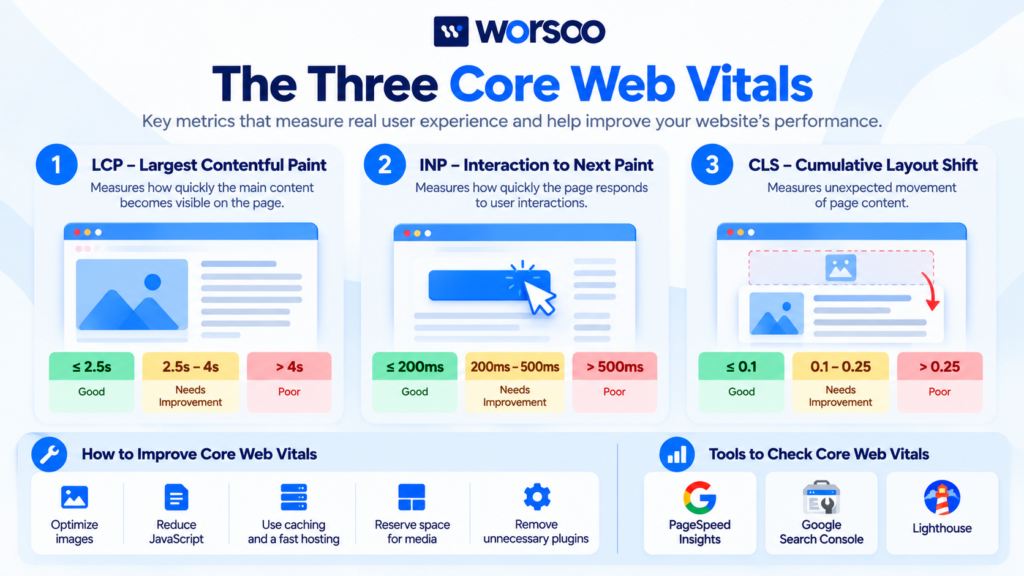
Understanding each metric is the first step toward improving website performance.
1. Largest Contentful Paint (LCP)
Largest Contentful Paint measures how long it takes for the largest image or text block visible within the initial viewport to render.
In simple terms, LCP helps answer this question:
How quickly does the main content become visible to the visitor?
The largest element might be a banner image, a main heading, or another prominent content block.
Google’s recommended LCP thresholds are:
| LCP Measurement | Result |
|---|---|
| 2.5 seconds or less | Good |
| More than 2.5 seconds up to 4 seconds | Needs improvement |
| More than 4 seconds | Poor |
These thresholds are assessed at the 75th percentile of page visits, typically evaluated separately for mobile and desktop.
What Causes a Poor LCP Score?
Common causes include:
- Slow server response times
- Large, unoptimized hero images
- Render-blocking CSS or JavaScript
- Unnecessary redirects
- Delayed loading of the main content
- Poor caching or delivery configuration
For example, imagine a business website displaying a large hero image at the top of its homepage.
If the image is oversized and takes several seconds to download, the main visible content may appear late.
Compressing the image, choosing a suitable format, and prioritizing its loading can help improve LCP.
How to Improve LCP
Start by identifying the largest visible element on the affected page.
Then consider:
- Optimizing the main image
- Improving server response time
- Reducing unnecessary redirects
- Removing resources that delay rendering
- Using effective caching
- Loading important content promptly
Avoid lazy-loading an image that is the main LCP element. Lazy loading may delay its appearance instead of improving performance.
2. Interaction to Next Paint (INP)
Interaction to Next Paint measures how responsive a webpage is to user interactions throughout a visit.
These interactions can include clicking a button, selecting a menu item, tapping a control, or typing into an interactive component.
INP considers how quickly the page visually responds after an interaction. It reflects more than the time required to complete an initial page load.
Google’s recommended INP thresholds are:
| INP Measurement | Result |
|---|---|
| 200 milliseconds or less | Good |
| More than 200 milliseconds up to 500 milliseconds | Needs improvement |
| More than 500 milliseconds | Poor |
What Causes a Poor INP Score?
Common causes include:
- Long-running JavaScript tasks
- Too much work on the browser’s main thread
- Heavy third-party scripts
- Complex event handlers
- Excessive layout recalculations
- Interactive features that perform too many operations at once
For example, a visitor clicks a navigation button, but the menu takes noticeable time to respond because the browser is busy executing other scripts.
The page may appear loaded, yet the interaction remains slow.
How to Improve INP
Depending on the underlying issue, useful changes may include:
- Breaking up long JavaScript tasks
- Removing unnecessary scripts
- Reducing expensive event-handler operations
- Deferring non-essential JavaScript
- Optimizing interactive components
- Limiting unnecessary third-party tools
Measure the actual problem before making changes. Removing scripts without understanding their function can break important website features.
3. Cumulative Layout Shift (CLS)
Cumulative Layout Shift measures unexpected movement of visible page content during a visitor’s experience.
A high CLS score can make reading difficult or cause someone to click the wrong element.
For example, a visitor begins clicking a button, but a banner loads above it and pushes the button down. The visitor may accidentally click a different link.
Google’s recommended CLS thresholds are:
| CLS Score | Result |
|---|---|
| 0.1 or less | Good |
| More than 0.1 up to 0.25 | Needs improvement |
| More than 0.25 | Poor |
Unlike LCP and INP, CLS is a score rather than a time measurement.
What Causes a Poor CLS Score?
Common causes include:
- Images without reserved dimensions
- Advertisements that change the page layout
- Dynamically injected banners
- Web fonts that change text rendering
- Content appearing above existing content unexpectedly
How to Improve CLS
Try these practical improvements:
- Specify image and video dimensions.
- Reserve space for advertisements and embeds.
- Avoid inserting new content above existing content without user interaction.
- Optimize font loading.
- Check popups and banners for unexpected layout changes.
These changes help keep the page visually stable while visitors read and interact with it.
Core Web Vitals at a Glance
The following table summarizes the three metrics and their recommended good thresholds.
| Metric | Measures | Good Threshold |
|---|---|---|
| LCP | Loading performance | ≤ 2.5 seconds |
| INP | Responsiveness | ≤ 200 milliseconds |
| CLS | Visual stability | ≤ 0.1 |
A page or group of URLs generally passes the Core Web Vitals assessment when the 75th-percentile values meet the good thresholds for all three metrics, provided sufficient data is available.
You can confirm the current thresholds through Google’s Core Web Vitals documentation.
How to Check Core Web Vitals for Your Website
You do not need advanced development skills to begin checking your website’s performance.
Several free tools can identify potential problems and help you decide which pages need attention.
1. Use Google PageSpeed Insights
Google PageSpeed Insights measures individual webpages on mobile and desktop.
It can display real-user performance data when sufficient data is available. It also provides lab measurements and diagnostics that help identify potential performance issues.
To test a page:
- Open PageSpeed Insights.
- Enter the page URL.
- Run the analysis.
- Review LCP, INP, and CLS when the corresponding data is available.
- Examine the recommendations.
- Repeat the test after making improvements.
Do not treat a single lab score as a complete representation of your site’s real-world performance.
Lab results help with debugging, while field data provides information about how real visitors experience your pages.
2. Check the Core Web Vitals Report in Google Search Console
The Core Web Vitals report in Google Search Console groups URLs according to real-world performance data.
It helps identify groups of pages with poor performance or opportunities for improvement.
You can review mobile and desktop reports, investigate representative URLs, and prioritize recurring issues.
One important limitation is that Search Console only includes URLs with sufficient field data for the report. It does not display a complete performance report for every URL on your website.
If no data is available, you can still use PageSpeed Insights or Lighthouse to run diagnostic tests.
3. Use Lighthouse for Technical Diagnostics
Lighthouse can analyze a webpage’s performance and provide suggestions for improvements.
It is useful when you want to investigate problems such as large resources, inefficient scripts, and layout shifts.
However, Lighthouse runs tests in a controlled environment, and its results may differ from real visitors’ experiences.
Use it alongside field data when both are available.
How to Improve Core Web Vitals on WordPress
WordPress websites can experience performance issues because of themes, plugins, images, hosting configurations, and external scripts.
You do not need to install another plugin automatically. Start by identifying the specific issue.
Optimize Images
Resize images to appropriate dimensions and compress them without unnecessarily reducing visual quality.
Use efficient formats such as WebP or AVIF when suitable.
Make sure the main visible image is not delayed by inappropriate lazy-loading settings.
Review Your Plugins
Some plugins add JavaScript, CSS, or external requests to every page.
Review whether each plugin is necessary and whether it can be configured to load resources only where they are needed.
Test your site after removing or changing plugins because some may support important functions.
Improve Caching and Hosting
Caching can reduce repeated processing and help deliver content more efficiently.
A slow server can also delay the beginning of page rendering.
Review hosting performance, page caching, browser caching, and content delivery options where appropriate.
Reduce Unnecessary JavaScript
Remove unused scripts, limit third-party tools, and reduce heavy processing on interactive pages.
The goal is to improve responsiveness without breaking essential features.
Prevent Unexpected Layout Shifts
Reserve space for images, banners, embedded content, and advertisements.
Check that fonts and dynamically added elements do not cause important content to move unexpectedly.
Review Performance After Changes
Retest affected pages and compare the results.
Avoid making multiple unmeasured changes at the same time if you need to identify which fix made a difference.
For a broader approach to technical problems, see Worsoo’s technical SEO checklist for website owners.
Common Core Web Vitals Mistakes to Avoid
Chasing a Perfect PageSpeed Score
A perfect lab score is not a requirement for ranking at the top of Google.
Focus on real performance problems and meaningful improvements rather than chasing 100 simply for its own sake.
Confusing Lab Data With Field Data
Lab data helps diagnose potential issues under controlled conditions. Field data reflects real-world visitor experiences.
Both have value, but they answer different questions.
Improving Only the Homepage
Your homepage may perform well while service pages or blog templates remain slow.
Check representative pages from different sections of your website.
Ignoring Mobile Performance
A page may perform differently on mobile devices because of connection speeds, device limitations, and mobile-specific scripts.
Test mobile performance as well as desktop performance.
Assuming Core Web Vitals Guarantee Higher Rankings
Core Web Vitals are part of Google’s broader page experience considerations. Improvements do not guarantee a ranking increase.
Content quality, relevance, search intent, competition, and other factors still matter.
Frequently Asked Questions About Core Web Vitals
What are Core Web Vitals in SEO?
Core Web Vitals are Google’s metrics for evaluating important aspects of real-world user experience: loading performance, responsiveness, and visual stability.
What are the three Core Web Vitals?
The three metrics are Largest Contentful Paint (LCP), Interaction to Next Paint (INP), and Cumulative Layout Shift (CLS).
What is a good Core Web Vitals score?
A good result means LCP is 2.5 seconds or less, INP is 200 milliseconds or less, and CLS is 0.1 or less. These thresholds are evaluated using real-user data at the 75th percentile when sufficient data is available.
Do Core Web Vitals directly affect Google rankings?
Google uses Core Web Vitals within its ranking systems, but they are only part of a broader evaluation. Good scores do not guarantee top rankings, and relevant content can remain competitive when another page has better performance measurements.
How often should I check Core Web Vitals?
Review Search Console regularly and retest important pages after significant changes to your theme, plugins, images, or scripts. The right frequency depends on how often the website changes.
Can WordPress plugins affect Core Web Vitals?
Yes. Plugins can add scripts, styles, external requests, or dynamic page elements that affect loading, responsiveness, and visual stability. Their impact depends on how they are implemented.
Which tool is best for testing Core Web Vitals?
PageSpeed Insights is a useful starting point because it provides both real-user data, when available, and lab diagnostics. Search Console helps monitor URL groups across your website.
Improve Your Website Performance With Worsoo
Core Web Vitals provide a practical way to identify performance issues that may affect visitors.
However, the right solution depends on the website. One page might need image optimization, while another could require JavaScript improvements, better caching, or changes to its layout.
Worsoo helps businesses improve search visibility through technical analysis, website optimization, and strategic SEO.
Explore our on-page and off-page SEO services to learn how website performance can fit into a broader optimization strategy.
If you want to identify technical issues affecting your website, contact Worsoo to discuss your SEO goals.
Final Thoughts
Core Web Vitals measure three important aspects of real-world webpage experience: loading performance, responsiveness, and visual stability.
Use LCP, INP, and CLS to identify problems, then investigate their causes with PageSpeed Insights, Search Console, and Lighthouse.
Prioritize improvements that make your website faster to use, easier to interact with, and more visually stable.
The objective is not simply to achieve a perfect performance score. It is to create a better experience for visitors while supporting your website’s wider SEO goals.