

An SEO content audit is a page by page review of your site content. You collect data for every URL, then give each page one of four decisions. Keep it, update it, merge it with another page, or remove it. The goal is a smaller, stronger site where every page has a clear job.
This matters because most pages never earn traffic. Ahrefs studied about 14 billion pages and found that 96.55% of pages get zero traffic from Google. Your site probably has its own share of those pages. They use crawl time, split your internal links and make the good pages harder to see.
This guide gives you the full system. You will get a decision framework, a worksheet layout, a sample inventory, clear rules for each action and a way to measure results. It works for a 50 page blog and a 5,000 page store.
Quick Answer: How Do You Run an SEO Content Audit?
Follow five steps.
- List every indexable URL on your site
- Add traffic, ranking, link and conversion data to each URL
- Apply four decision rules to each page
- Take the action. Keep, update, merge or remove
- Measure the change in Search Console after 8 to 12 weeks
A content audit is one part of a wider SEO audit. The technical side checks how Google reaches your pages. The content side checks whether those pages deserve to rank.
The Four Decisions at a Glance
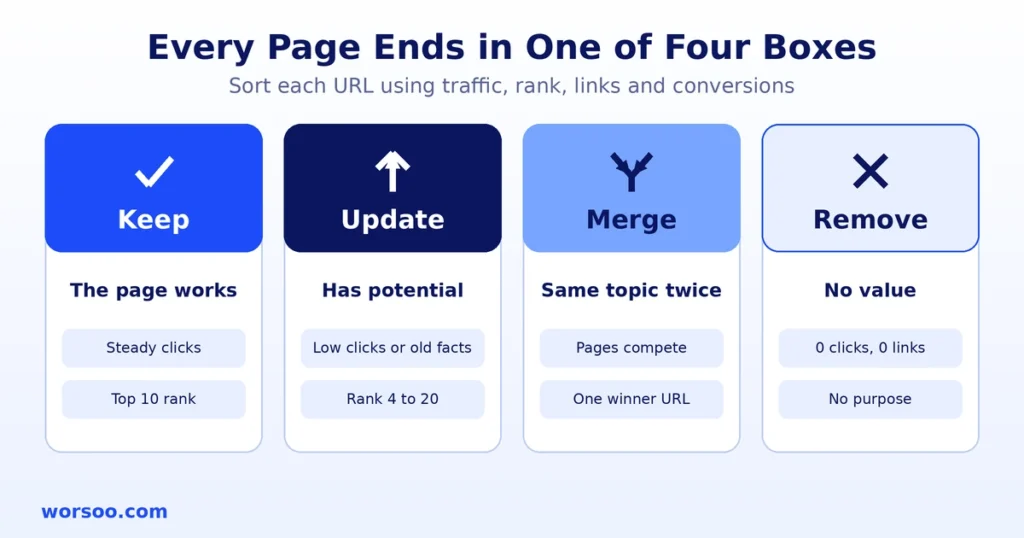
Every page ends in one of four boxes. Learn these first. The rest of the guide shows you how to sort pages into them.
| Decision | What It Means | Typical Signal | Typical Share of a Blog |
|---|---|---|---|
| Keep | The page works. Leave it alone or make a tiny fix | Steady clicks, good rankings, accurate content | 20 to 40% |
| Update | The page has potential but is weak or old | Impressions with few clicks, falling traffic, old facts | 25 to 40% |
| Merge | Two or more pages cover the same topic | Pages compete for the same keyword | 10 to 20% |
| Remove | The page has no value to users or search | Zero clicks, zero links, no purpose | 10 to 25% |
The share column is a rough guide from common audit patterns, not a rule. Your own numbers will differ. A young site often has more pages to update. An older site often has more to merge and remove.
Step 1: Build Your Content Inventory
You cannot judge pages you cannot see. Start with a full list.
Pull URLs from three places and combine them.
- Your XML sitemap
- A site crawl with Screaming Frog or Ahrefs Site Audit
- The Pages report in Google Search Console
Remove duplicates. Then keep only pages that matter for search, such as blog posts, service pages, category pages and guides. Leave out login pages, cart pages and tag archives you already block.
Worksheet Columns
Use one row per URL. These columns cover everything you need.
| Column | What to Enter | Where to Get It |
|---|---|---|
| URL | Full page address | Crawl or sitemap |
| Title | Current page title | Crawl |
| Primary keyword | The main term the page targets | Your content plan |
| Publish date | Original date | CMS |
| Last update | Date of last real edit | CMS |
| Clicks, 12 months | Organic clicks from Google | Search Console |
| Impressions | Times shown in results | Search Console |
| Average position | Mean rank for the page | Search Console |
| Referring domains | Sites that link to the page | Ahrefs |
| Conversions | Leads, sales or sign ups | Analytics |
| Word count | Length of the main content | Crawl |
| Decision | Keep, Update, Merge or Remove | Your review |
| Action note | What to do and who does it | Your review |
| Status | To do, in progress or done | Your tracker |
Search Console only keeps 16 months of data, so export your numbers before you start. Use a 12 month window. A shorter window can punish seasonal pages that only get traffic in some months.
Step 2: Apply the Decision Framework
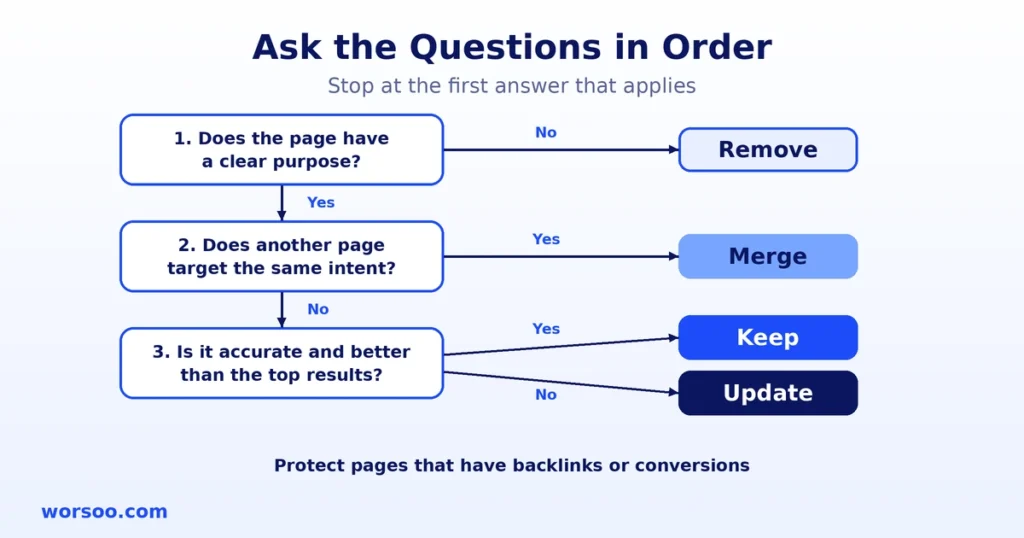
Now sort each page. Ask the four questions below in order. Stop at the first one that applies.
| Order | Question | If Yes | If No |
|---|---|---|---|
| 1 | Does the page have a clear purpose, such as traffic, links, leads or support value? | Go to question 2 | Remove |
| 2 | Does another page on your site target the same search intent? | Merge | Go to question 3 |
| 3 | Is the page accurate, complete and better than what ranks today? | Keep | Update |
Two protection rules sit on top of this table.
Protect pages with links. If a page has backlinks from other sites, never delete it without a redirect. Those links carry value. Our guide to the backlink profile shows how to find them.
Protect pages that convert. A page with low traffic but steady leads is not a failure. Keep it, and consider improving it.
Starting Thresholds
These numbers help you sort large sites fast. Treat them as starting points and adjust to your site size and niche.
| Decision | Starting Rule |
|---|---|
| Keep | Top 10 ranking for the target keyword, clicks stable or rising, facts still correct |
| Update | Impressions are high but clicks are low, average position between 4 and 20, clicks down 20% or more year over year, or facts are outdated |
| Merge | Two or more URLs rank for the same main keyword, or several thin pages cover one topic |
| Remove | Zero clicks in 12 months, no referring domains, no conversions and no reason to exist |
Step 3: Check Quality With Google Own Questions
Numbers alone cannot judge quality. Google gives a list of self check questions in its guide to helpful, people-first content. Use them on every page you plan to keep or update.
Ask these five questions.
- Does the page give original information, research or analysis, or does it only repeat other pages?
- Does it fully cover the topic, with detail the reader can use?
- Is it clear who wrote it and why they can be trusted?
- Does the title describe the page honestly?
- Would a reader feel they learned enough to stop searching?
If most answers are no, mark the page Update or Remove. This also ties your audit to E-E-A-T, because expert authors, real examples and clear sources all raise page quality.
Sample Content Inventory
Here is how a finished worksheet looks. These rows are sample data made to show the method. They are not real client results.
| URL Topic | Clicks, 12 Mo | Impressions | Avg Position | Ref. Domains | Decision | Reason |
|---|---|---|---|---|---|---|
| What is SEO | 1,840 | 52,000 | 6.2 | 14 | Update | Good rank, low click rate, old statistics |
| SEO tips 2022 | 12 | 3,100 | 28.4 | 0 | Merge | Overlaps with a newer SEO tips guide |
| SEO tips 2024 | 310 | 9,800 | 11.7 | 3 | Update | Becomes the main page after the merge |
| Keyword research basics | 2,260 | 31,000 | 3.1 | 22 | Keep | Strong rank and clicks, facts correct |
| Our office party photos | 0 | 40 | 0 | 0 | Remove | No search value, no links |
| Link building guide | 85 | 14,200 | 9.4 | 31 | Update | Many links, weak content, rank can rise |
| Local SEO checklist | 140 | 6,500 | 14.0 | 2 | Update | Needs depth to pass page one |
| Free SEO tool list | 0 | 150 | 55.0 | 1 | Merge | Fold into a stronger tools page, then redirect |
Notice two patterns. First, the link building guide has few clicks but many referring domains. That page is an asset, so it is updated and not removed. Second, the two SEO tips pages become one. The older page is redirected to the newer one.
Step 4: Take Action on Each Decision
How to Update a Page
Updating means real improvement, not a date change. Work through this list.
- Check every fact, number and date, and replace old statistics with recent, named sources
- Compare the page with the top ranking results and fill any gaps
- Rewrite the opening so it answers the main question in two or three sentences
- Add a table, example or step list where it helps
- Add or improve the author name and short bio
- Fix broken links and add links to your newer pages
- Improve the title and meta description to lift click rate
Only change the visible update date when you made a meaningful edit. A fake date can hurt trust. Our guide to SEO content writing covers how to structure a page that is ready to rank.
How to Merge Pages
Merge when several pages compete for one topic. Splitting power across pages makes all of them weaker.
- Pick the winner. Choose the page with the best rankings, links and URL
- Move the best sections from the other pages into the winner
- Rewrite so the final page reads as one piece, not a patchwork
- Set a permanent 301 redirect from each old URL to the winner. Google treats a permanent redirect as a strong signal that the target should be the main version
- Update internal links so they point straight to the winner
- Remove the old URLs from your XML sitemap and submit the sitemap again
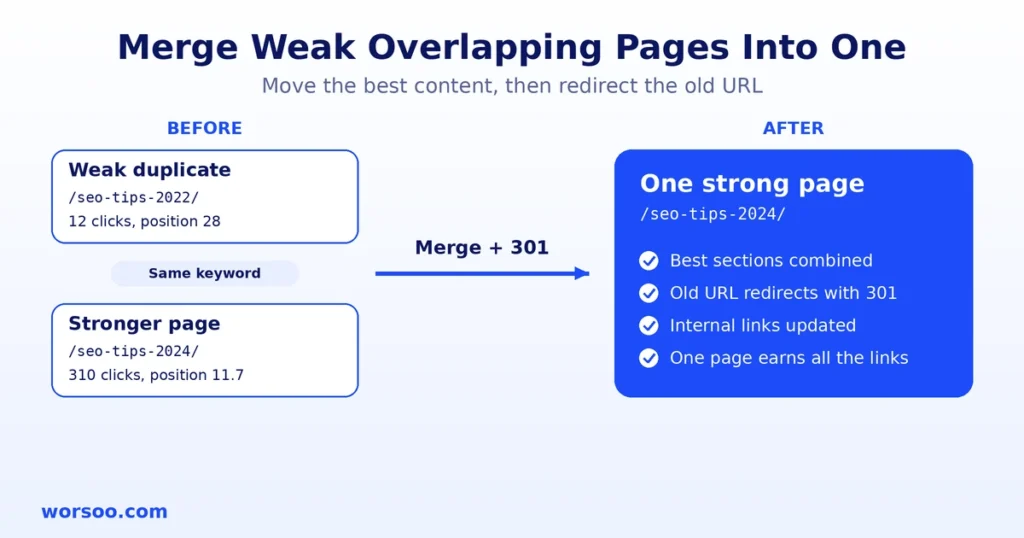
Redirect to the closest match, not to the home page. A redirect to an unrelated page helps nobody.
How to Remove a Page
Choose the removal method by page type.
| Situation | Best Method |
|---|---|
| Page has links or a close replacement exists | 301 redirect to the closest relevant page |
| Page has no links and no replacement | Remove it and return a 404 or 410 status |
| Page must stay for users but should not rank | Add a noindex tag |
| Page is private or for staff only | Put it behind a login |
After removal, delete internal links that point to the old URL. Otherwise you create broken links.
Step 5: Measure the Results
Do not judge results in the first week. Google needs time to recrawl and reassess pages. Check again after 8 to 12 weeks.
Compare these numbers before and after.
| Metric | What Good Looks Like |
|---|---|
| Clicks to updated pages | Rising against the old 12 month average |
| Average position of merged pages | Better than the best of the old pages |
| Indexed pages | Fewer low value pages in the index |
| Crawl activity on key pages | More visits to pages you want found |
| Conversions | Stable or higher |
Track each batch of changes in your worksheet. That way you know which action caused which result.
Common Content Audit Mistakes
| Mistake | Why It Hurts | Fix |
|---|---|---|
| Deleting pages with backlinks | You lose link value | Redirect to a close match |
| Judging pages on three months of data | Seasonal pages look dead | Use 12 months |
| Changing dates without real edits | Readers and Google lose trust | Update only with real changes |
| Redirecting everything to the home page | Users land on the wrong content | Redirect to the closest topic |
| Auditing only traffic | You miss links and leads | Add links and conversions |
| One big audit, then nothing | Content ages again | Repeat on a schedule |
How Often Should You Audit Content?
Most blogs do well with a full audit twice a year. Large sites with hundreds of new pages each month should review a section every quarter. Also run one after a Google core update that hurt your traffic, or after a site redesign.
Why a Content Audit Also Helps AI Search
AI answer tools such as Google AI Overviews and ChatGPT pull from pages that are clear, current and focused. A content audit helps in three ways.
First, merging removes conflicting pages, so the answer on your site is consistent. Second, updating replaces old facts with current ones, which makes your page safer to quote. Third, pages with a short direct answer at the top, a table and a clear author are easier for AI tools to summarize.
Think of each kept page as a source worth citing. If a page would not be cited, it needs work or removal.
SEO Content Audit Checklist
- Full URL list built from sitemap, crawl and Search Console
- 12 months of clicks, impressions and position added
- Backlinks and conversions added for each URL
- Every page marked Keep, Update, Merge or Remove
- Pages with backlinks protected from deletion
- Quality questions answered for pages you keep
- Update list written with specific edits
- Merge winners chosen and 301 redirects mapped
- Removal method chosen for each removed page
- Internal links fixed after merges and removals
- XML sitemap updated and resubmitted
- Results checked after 8 to 12 weeks
Frequently Asked Questions
What is an SEO content audit?
It is a review of every page on your site that tells you which pages to keep, update, merge or remove. It uses traffic, ranking, link and conversion data.
How long does a content audit take?
A site with 100 pages can take one to two days. A site with 1,000 pages can take one to two weeks, depending on your tools and team size.
Should I delete pages with no traffic?
Not always. Check for backlinks, conversions and a clear purpose first. If a page has none of these and cannot be improved, remove it. If it has links, redirect it.
Will removing pages hurt my SEO?
Removing weak pages does not hurt when you do it right. Redirect pages that have links and keep pages that serve users. Many sites see better results after trimming.
What is the difference between a content audit and an SEO audit?
An SEO audit covers technical health, content and links. A content audit looks only at the quality and performance of your pages.
What tools do I need?
Google Search Console, Google Analytics, a crawler such as Screaming Frog and a backlink tool such as Ahrefs. A spreadsheet holds the worksheet.
Need Help Auditing Your Content?
A content audit is easy to start and hard to finish well. Rankings, links and revenue all depend on each decision. Our team can review your pages, build the worksheet and give you a clear action plan. See our SEO services and ask for a content audit of your site.
If you want to start alone, export your Search Console data today and sort pages by clicks. Your zero click pages show where to look first.